The TMF is sponsored by Clips4sale - By supporting them, you're supporting us.
Reminder - We have a ZERO TOLERANCE policy regarding content involving minors, regardless of intent. Any content containing minors will result in an immediate ban. If you see any such content, please report it using the "report" button on the bottom left of the post.
>>> If you cannot get into your account email me at [email protected] <<<
Don't forget to include your username
If you Do not have an account with blogtalkradio?: Get one.
Got one?
Okay next.
On your main page go to:
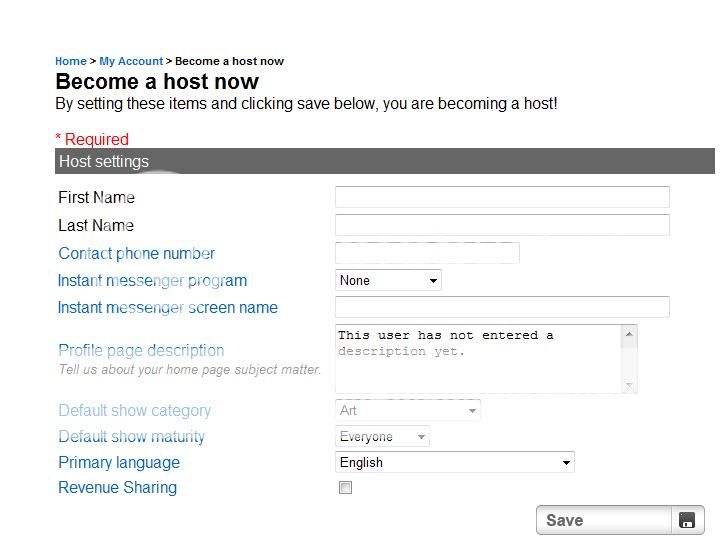
My Account >> Become a Host.
Select that choice.
This is what you'll see:
Fill out the blanks.
If you are curious about why they might want/need a certain piece of information?: Click on the question. It will bring up a pop-up, explaining why it is requesting this.
Once you hit Save you will be brought to a page with your:
Now you're ready to schedule a show. This is how you do that.
My Account >> Segments.
On the page that pops up: Fill out all the fields. This is your place to sign up for shows.
Finished?
Click Submit.
Need the link to be able to share with others?
Go back to your Segments page.
Scroll down to Upcoming Segments.
Select Show.
Click on the linked show name.
A blue page will popup.
Copy the URL code in the Navigation bar.
Paste where you desire.
Getting ready for show:
My Account >> Switchboard.
There will be a Green Box that says Start Chat on the bottom left of your switchboard.
Click. Copy URL. Share.
All of your information will be available right on the switchboard. Including your Guest Call in number, which will be at the Top Left of your switchboard in decent sized lettering.
Uploading MP3 Music/Sound effects:
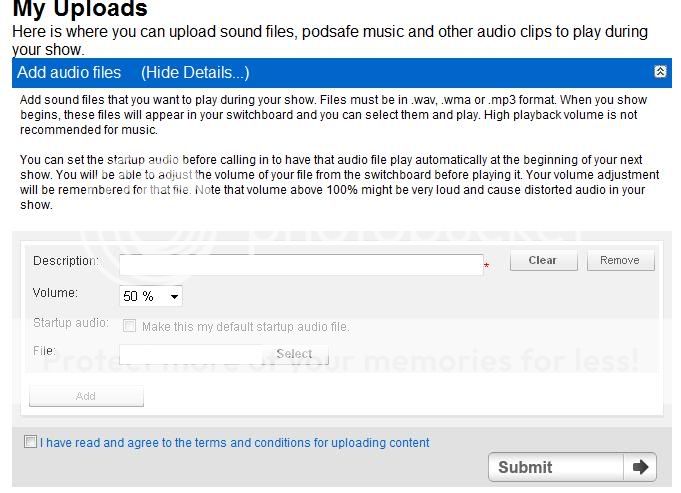
My Account >> Uploads.
Add Audio files >> Show Details.
Enter your description for the audio file.
Choose how high you want the sound to be. (For most audio files 50% is sufficient. If it's a naturally loud song, anything higher might distort the audio.)
Select a MP3 from your hard-drive.
Checkmark the: I have read and agree to the terms and conditions for uploading content box.